JudgeAny EST. 2026
ReviewComputingNº 090 · Updated 2026-10-02

Crucial X10 Pro Review: 2,100 MB/s Speed — If Your Port Keeps Up

Crucial X10 Pro review: 2,100/2,000 MB/s over USB 3.2 Gen 2x2, sustained writes above 1,750 MB/s, IP55 rugged. Measurements and owner impressions, aggregated.

Words JudgeAny EditorsRead 4 minUpdated 2026-10-02Prices live on Amazon
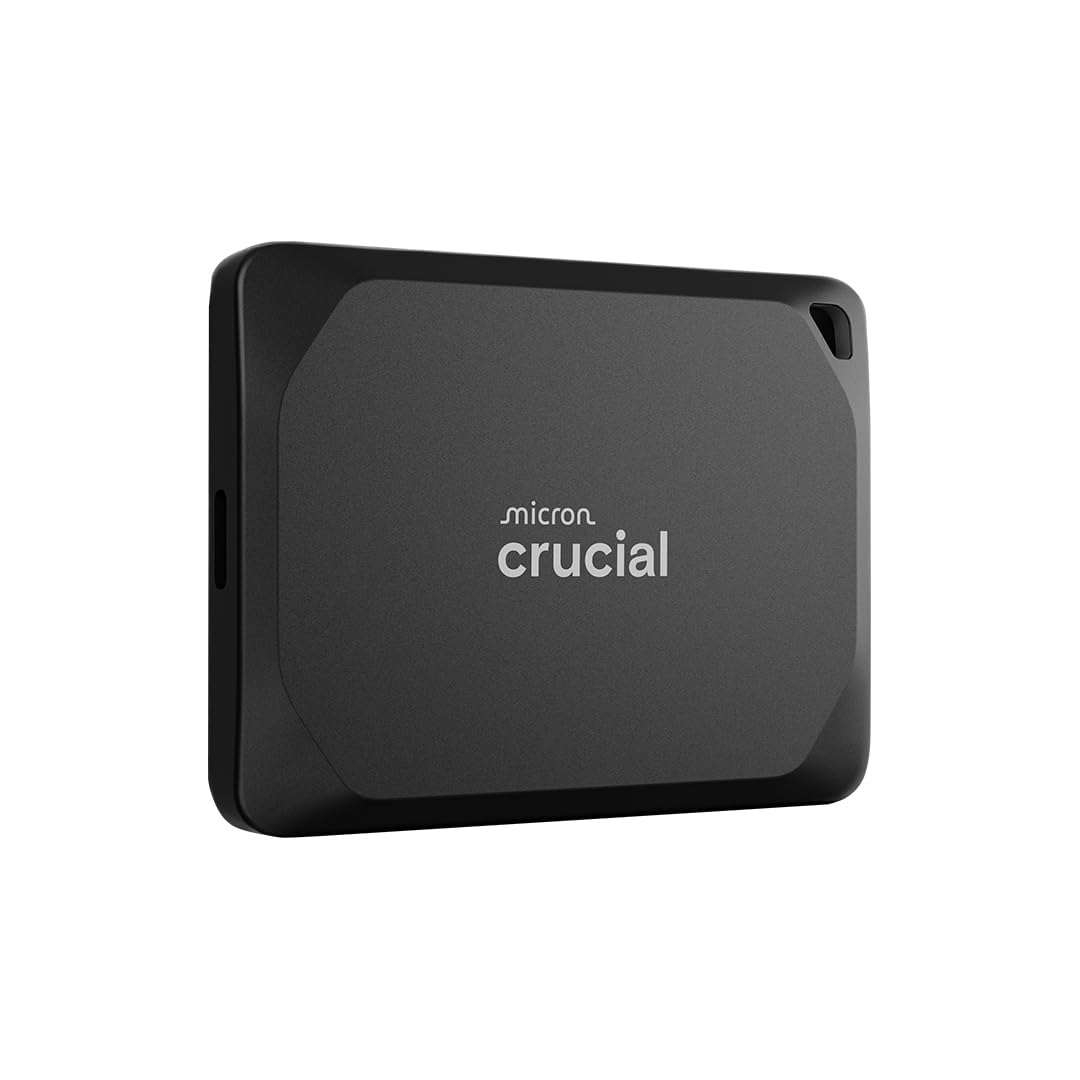
Crucial X10 Pro 1TB Portable SSD, Up to 2,100MB/s Read, 2,000MB/s Write, USB-C, Black
JA 8.6
Fig. 01 — Crucial X10 Pro 1TB Portable SSD, Up to 2,100MB/s Read, 2,000MB/s Write, USB-C, BlackMargin notes · sourced

The Crucial X10 Pro is the right drive for a specific machine: one with a USB 3.2 Gen 2x2 port. There, it delivers near-rated burst speed and sustained writes that held above 1,750 MB/s for ten minutes in Tom's Hardware's endurance test. Without that port, the cheaper X9 Pro gets you the same experience.

— THE VERDICT · JUDGEANY EDITORS

Why the X10 Pro matters

Crucial launched the X10 Pro in July 2023 alongside the X9 Pro as its flagship portable SSD — the fastest external drive Micron had ever shipped. The pitch is simple: USB 3.2 Gen 2x2 (20 Gbps) with sequential read/write up to 2,100/2,000 MB/s, IP55 dust and water resistance, 256-bit AES hardware encryption, and a 5-year warranty, all in a 65 x 50 mm anodized-aluminum shell. Tom's Hardware called it the fastest 20 Gb/s SSD it had tested and gave it an Editor's Choice award. This review pulls together Crucial's specifications, published measurements from review outlets, and aggregated owner impressions. We don't run a test lab; every number below names the publication that measured it.

Performance: near-rated burst speed, class-leading endurance

Tech Advisor tested the 2TB model and measured 2,061 MB/s read and 1,840 MB/s write in CrystalDiskMark 8.0.4's default profile — close to Crucial's rated 2,100/2,000. In the more demanding real-world profile it managed 1,857/1,694 MB/s, and the AS SSD and AJA System Test benchmarks agreed. Not every outlet got the same story, though. StorageReview's Blackmagic test, run single-threaded on a Lenovo ThinkStation P520 workstation, recorded 1,564 MB/s write and 1,723 MB/s read — below Crucial's claims, and behind the Lexar SL660 Blaze and ADATA SE880 in every sequential metric. The verdict still holds, and the reason is endurance: in Tom's Hardware's 15-minute sustained-write Iometer test, the X10 Pro held 1,750–1,780 MB/s for over 11 minutes before settling near 1,400 — still faster than most rival drives' best burst speeds. For creators moving hundreds of gigabytes, sustained throughput beats a burst leaderboard, and that is where this drive leads. KitGuru's 8.5/10 rating for the 2TB model lands in the same place.

Design, durability, and what's in the box

The enclosure is anodized aluminum on top and sides with a rubberized soft-touch base that keeps it from sliding off a desk. At 65 x 50 x 10 mm and 42 g it is roughly the footprint of a credit card, with a lanyard hole that doubles as the housing for the activity LED. IP55 means protection against dust and low-pressure water jets, not submersion. The drop rating is 2 m (7.5 ft), though Tech Advisor notes Crucial's drop test was onto carpet rather than concrete. Inside are a Silicon Motion SM2320 controller and Micron 176-layer TLC NAND, per KitGuru. In the box: the drive, a short USB-C to USB-C cable, and a quick-start guide. Trials for Adobe Creative Cloud and Mylio Photos+ come with registration.

Compatibility: the port is the whole story

The full 2,100/2,000 MB/s only shows up on a USB 3.2 Gen 2x2 (20 Gbps) port. Tech Advisor measured roughly 1,050 MB/s on a Gen 2 port and half of that again on Gen 1 — port limits, not drive limits. Those ports remain rare, and Tech Advisor warns that USB4 won't rescue Gen 2x2, since the USB consortium never made it a subset of USB4; Tom's Hardware adds that some USB4 controllers simply fall back to 10 Gbps. No USB-C to USB-A adapter ships in the box, so older machines need their own — TechSpot lists this as a con. Device support is otherwise broad: Windows, macOS, Android, iPad, Linux, Xbox, and PlayStation all work over USB-C, and the drive ships formatted exFAT. Without a 20 Gbps port, the cheaper X9 Pro delivers the same experience for less. Tech Advisor's verdict is blunt: this drive's value depends entirely on having the right port.

Security and software

The 256-bit AES hardware encryption with password protection is transparent to transfers — unlike software encryption, it doesn't slow the drive down, which makes the X10 Pro a reasonable way to carry client work. One blemish at launch: Tech Advisor found Crucial's own software tools didn't recognize the X10 Pro, with the promised Hedge backup tool and Portable SSD Utility still missing. If you need encryption, set the password and move on; don't buy this drive for a software ecosystem.

Who should buy it

Buy the X10 Pro if your machine has a USB 3.2 Gen 2x2 port and you move big files for a living — photographers, videographers, and anyone editing off the drive get near-rated burst speed plus sustained writes no 20 Gbps rival matched in Tom's Hardware's testing. Skip it if your ports are Gen 2 or older, or if you live on a Mac with only USB4/Thunderbolt: the cheaper X9 Pro gives you identical speeds there, and Thunderbolt drives are the only way to go faster.

On Film

Video review · third-party footage, not filmed by JudgeAny
Why the Crucial X10 Pro 2TB portable SSD is a creative pro's best friend - Review · APH NetworksVia YouTube
Burst speed2,061/1,840 MB/s measured (Tech Advisor, CrystalDiskMark 8.0.4)8.6
Sustained writesAbove 1,750 MB/s for 10+ min (Tom's Hardware, 15-min Iometer)9.2
DurabilityIP55 · 2 m drop rating · 5-year warranty8.8
Portability65 x 50 x 10 mm · 42 g9.0
ValueCheaper X9 Pro exists for 10 Gbps users; price is live on Amazon8.2
JudgeAny Score8.6

The Dossier

Technical file · compiled from specs & reviews
InterfaceUSB 3.2 Gen 2x2 (20 Gbps), USB-C
Sequential read / writeUp to 2,100 MB/s / 2,000 MB/s (Crucial, CrystalDiskMark 8.0.1)
Capacities1TB / 2TB / 4TB
NAND / controllerMicron 176-layer TLC NAND · Silicon Motion SM2320
Encryption256-bit AES hardware encryption + password protection
DurabilityIP55 dust/water resistance · drop-resistant up to 2 m (7.5 ft)
Dimensions / weight65 x 50 x 10 mm · 42 g (1.48 oz)
FormatexFAT (ships); reformatable to NTFS/APFS
Warranty / power5-year limited warranty · USB bus-powered (5V/1A)
In the boxDrive, USB-C to USB-C cable, quick-start guide; Adobe CC + Mylio Photos+ trials

+ WHAT EARNS IT

  • Near-rated burst speed on the right port: Tech Advisor measured 2,061/1,840 MB/s in CrystalDiskMark 8.0.4, close to the 2,100/2,000 rating
  • Class-leading sustained writes: Tom's Hardware's 15-minute test held 1,750–1,780 MB/s for over 11 minutes before settling near 1,400
  • Pocketable and rugged: 65 x 50 x 10 mm, 42 g, IP55 rating, 2 m drop rating, and a 5-year warranty
  • Hardware encryption: 256-bit AES with password protection, transparent to transfers
  • Broad device support: Windows, macOS, Android, iPad, Linux, Xbox, and PlayStation over USB-C

− WHAT COSTS IT

  • Peak speeds need a USB 3.2 Gen 2x2 (20 Gbps) port, which is still rare; on a Gen 2 port it drops to roughly 1,050 MB/s, where the cheaper X9 Pro is the smarter buy
  • No USB-C to USB-A adapter in the box, and the included cable is a short 23 cm run
  • Sequential benchmarks don't always crown it: StorageReview's Blackmagic table put the Lexar SL660 Blaze and ADATA SE880 slightly ahead
  • Crucial's own software tools didn't recognize the drive at launch, per Tech Advisor; some USB4 hosts fall back to 10 Gbps anyway

Keep comparing

Same evidence standard · our reviews

Sources

Every major conclusion above maps to a source here · see our methodology.

Questions, answered

Will the X10 Pro hit 2,100 MB/s on my laptop?
No. You need a USB 3.2 Gen 2x2 (20 Gbps) port to hit Crucial's rated speeds. On a Gen 2 (10 Gbps) port, Tech Advisor measured roughly 1,050 MB/s, and half of that again on Gen 1 — port limits, not drive limits. Some USB4 controllers also fall back to 10 Gbps, per Tom's Hardware.
Does it work with USB-A ports?
Yes, but bring your own adapter. The box ships with only a short USB-C to USB-C cable, and TechSpot lists the missing Type-A adapter as a con. Older machines with only USB-A ports will run the drive at Gen 1 or Gen 2 speeds.
Is the encryption hardware-based?
Yes. The drive carries 256-bit AES hardware encryption with password protection, applied transparently so transfers don't slow down — a solid baseline for carrying client work around.
Can it survive a drop?
Yes, with caveats. Crucial rates it for drops up to 2 m (7.5 ft) and IP55 dust and water resistance — splashes and dust, not submersion. Tech Advisor notes the drop test was onto carpet, so don't treat it as indestructible.
Is the X10 Pro worth it over the X9 Pro?
Yes — on a machine with a 20 Gbps port, you get roughly double the X9 Pro's throughput plus the sustained-write endurance. On anything slower, Tech Advisor's verdict is blunt: the X9 Pro gives you the same experience for a third less money.
FILED UNDER · BEST COMPUTING 2026

The one to buy.

The Crucial X10 Pro is the right drive for a specific machine: one with a USB 3.2 Gen 2x2 port. There, it delivers near-rated burst speed and sustained writes that held above 1,750 MB/s for ten minutes in Tom's Hardware's endurance test. Without that port, the cheaper X9 Pro gets you the same experience.

Also available at Best Buy · Walmart · B&H Photo Video · prices live on retailer sites

As an Amazon Associate, JudgeAny earns from qualifying purchases. Price and availability are accurate as of the date/time indicated and are subject to change.

Crucial X10 Pro 1TB Portable SSD, Up to 2,100MB/s Read, 2,000MB/s Write, USB-C, BlackCrucial
Check Price