JudgeAny EST. 2026
ReviewComputingNº 196 · Updated 2026-10-30

Keychron K2 Max Review: A Compact 75% Board That Covers Mac and Windows

Keychron K2 Max review: a 75% QMK wireless keyboard with hot-swappable Super switches — from official specs and published reviews, not a lab.

Words JudgeAny EditorsRead 5 minUpdated 2026-10-30Prices live on Amazon
Keychron K2 Max 75% Layout QMK Custom Mechanical Keyboard, Wireless 2.4 GHz/Bluetooth/Wired Compact 84 Keys with White Backlight, Super Red Switch Gaming Keyboard for Mac/Windows/Linux
JA 8.4
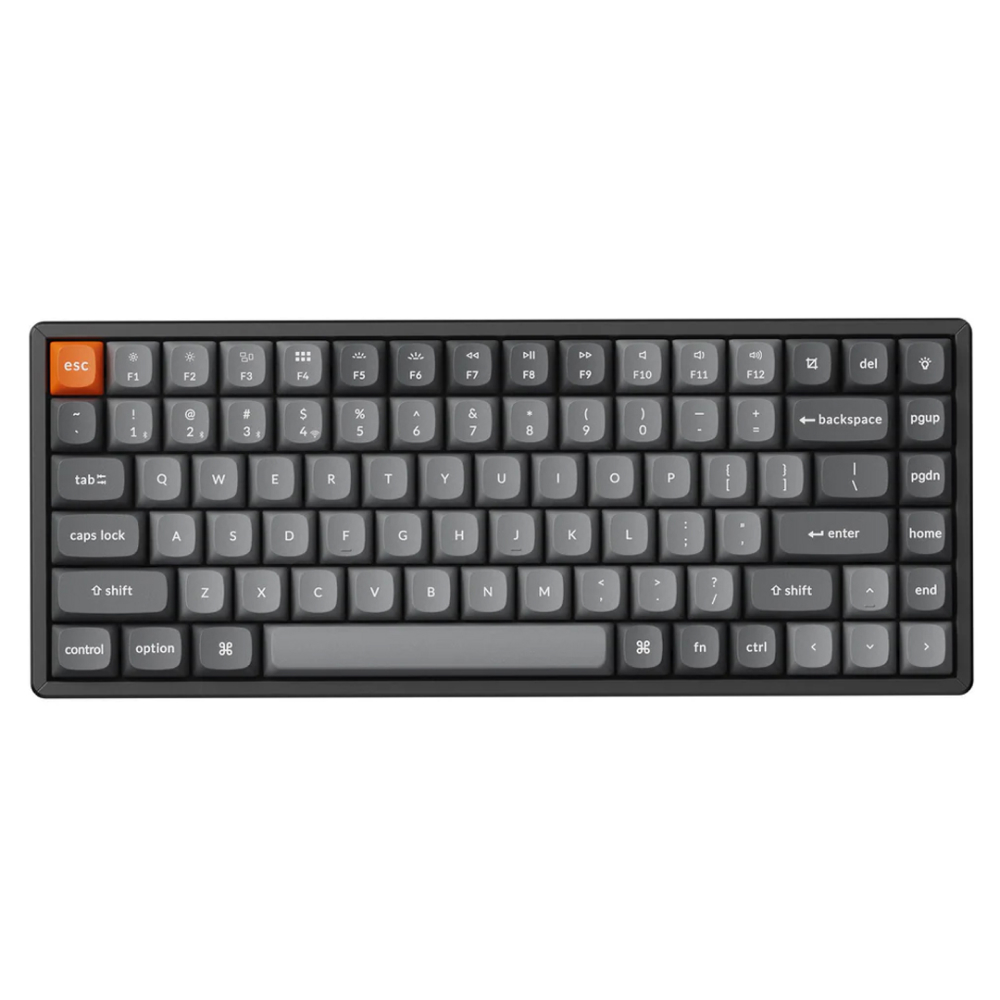
Fig. 01 — Keychron K2 Max 75% Layout QMK Custom Mechanical Keyboard, Wireless 2.4 GHz/Bluetooth/Wired Compact 84 Keys with White Backlight, Super Red Switch Gaming Keyboard for Mac/Windows/LinuxMargin notes · sourced

The Keychron K2 Max is a 75% board for Mac and Windows desks, with hot-swappable Super switches and three-way connectivity at 1,000 Hz over 2.4 GHz and wired. QMK remapping completes the package. Its tall profile, 90 Hz Bluetooth polling, and version-dependent frame keep it from being a travel or budget pick. Check the current price on Amazon before deciding.

— THE VERDICT · JUDGEANY EDITORS

The Keychron K2 Max is the 75% member of Keychron's K Max line: 84 keys with a function row, arrow keys, and a navigation column, and no numpad. This review covers the fully assembled Super Red version with white backlight sold on Amazon (model K2M-A1). Brown and RGB versions are sold separately, and switch and frame options change the weight and the feel, so check the exact variant before ordering. JudgeAny runs no test lab of its own. Every measurement and typing impression below belongs to a named published source, not to this site, and the scores at the end are editorial judgment based on that published evidence.

Typing feel and sound: damped, not silent, and easy to change

Keychron's Super switches define the board. The Amazon variant covered here uses Super Red linear switches, while Super Brown (tactile) and Super Banana (tactile) versions are also sold, and Keychron rates the Super switch family at up to 50 million clicks. Under the switches sit multiple layers of acoustic foam — IXPE, PET, and EPDM, per Keychron — over a steel plate, with double-shot PBT keycaps in Keychron's curved OSA profile. No dedicated K2 Max typing test from a major lab could be verified, so the closest published sound evidence comes from the sibling K8 Max, which shares the Super switches and the foam stack: Tom's Guide describes a dampened metallic clack on that board, with the foam cushioning the sound so it does not ring out, and MakeUseOf calls the Brown-switch sound thocky. The K8 Max is a tenkeyless board with a tray mount, while the K2 Max uses a plate mount, so the comparison is approximate rather than exact. The switch and foam family is shared, though, and both outlets settle on the same word: damped.

Build quality: two frames, one tall board

The K2 Max comes in two frame versions, and the choice matters. The plastic-frame version measures 311.54 x 121.54 mm and weighs 940 g, while the aluminum-frame version measures 316.62 x 126.56 mm and weighs 1,080 g, per the published specification table. Three levels of adjustable typing angle — 5, 9, and 12 degrees — plus the curved OSA keycaps are Keychron's ergonomic pitch, per the Amazon listing. The board sits high, at 32.06 mm at the front and 41.54 mm at the rear including keycaps, so buyers coming from a laptop keyboard may want a wrist rest. There is no knob: KeebFinder's comparison confirms the K2 Max has no knob option, unlike the V2 Max, so volume control stays on key combinations.

Connectivity and software: three ways in, and real remapping

Keychron lists 2.4 GHz wireless, Bluetooth 5.1, and wired USB-C, with Bluetooth pairing to up to three devices, and the Amazon listing says two layouts can be saved on the board, one for each system. Polling runs at 1,000 Hz over 2.4 GHz and wired, dropping to 90 Hz over Bluetooth, per Keychron and The Desk Vibe, which means fast-paced gaming belongs on the receiver or the cable. N-key rollover works in both wireless and wired modes, per Keychron. Remapping runs through open-source QMK firmware and the Keychron Launcher web app, per Keychron, and KeebFinder's comparison also lists VIA support; PCCaseGear notes the Launcher needs a current version of Chrome, Opera, or Edge and a wired connection. A physical toggle switches the layout between macOS and Windows, with extra keycaps for both systems in the box, per Keychron.

Battery: a headline figure with a caveat

Keychron rates the 4,000 mAh battery at around 190 hours with the backlight off and around 100 hours with RGB at its lowest brightness, and labels the backlight-off figure a lab test result that may vary with actual use. That means the headline figure belongs to backlight-off typing, and RGB use pulls it down hard: on the sibling K8 Max, Tom's Guide reports up to 30 hours over Bluetooth with RGB lighting on, which shows how far the real RGB number can sit below the headline. No charging time for the K2 Max could be verified from accessible sources, so none is quoted here.

The conflicting evidence, and why the verdict still holds

The published record disagrees with itself in three places worth stating plainly. First, Bluetooth version: Keychron's specification table and the Amazon listing say Bluetooth 5.1, while The Desk Vibe's 2026 roundup lists Bluetooth 5.2 for the K2 Max. The safe reading is 5.1, since that is what the manufacturer publishes. Second, frame material: the aluminum frame gets the marketing attention, but a plastic-frame version exists at 940 g, and MakeUseOf's sibling K8 Max review flags a plastic base as a limitation for advanced enthusiasts. Buyers who want metal must pick the aluminum-frame variant deliberately. Third, value: Tom's Guide's K8 Max verdict calls that board pricey against cheaper Keychron models, while The Awesomer calls the K2 Max its go-to keyboard. The gap closes once the tier is clear, because the K2 Max competes as a compact 75% tri-mode board, not as the cheapest board Keychron sells. None of this overturns the main conclusion, because the complaints land on version choice, Bluetooth fine print, and price tier rather than on the core package of layout, switches, and connectivity.

Who should buy it

Buy the K2 Max if you want a compact 75% board for a mixed Mac and Windows desk, with hot-swappable switches, three-way connectivity, and deep QMK remapping, and you type mostly in one place. It suits writers, programmers, and anyone who moves one keyboard between machines. Skip it if you need a numpad, want a knob, or want magnetic switches with rapid trigger. That last one is the K2 HE, a different board. Skip it too if you want the lightest travel keyboard or a budget board. Check the current price on Amazon before deciding, and confirm the switch, backlight, and frame variant before ordering, since Red, Brown, and Banana versions feel different under the fingers.

Typing feelSuper Red linear switches rated up to 50 million clicks, IXPE/PET/EPDM foams, steel plate, OSA PBT keycaps, per Keychron; Tom's Guide calls the sibling K8 Max sound a dampened metallic clack8.5
Build qualityABS or ABS+aluminum frame versions, 940 g plastic vs 1,080 g aluminum, three typing angles, per the specification table; no knob, per KeebFinder; tall 41.54 mm rear height8.4
Connectivity & software2.4 GHz, Bluetooth 5.1 for 3 devices, USB-C wired; QMK plus Keychron Launcher, VIA listed by KeebFinder; 1,000 Hz wired/2.4 GHz but only 90 Hz over Bluetooth, per Keychron8.7
Battery4,000 mAh rated around 190 hours backlight off and around 100 hours RGB at lowest brightness, per Keychron, labeled a lab result; sibling K8 Max managed up to 30 hours Bluetooth with RGB on, per Tom's Guide8.2
ValueMid-range against Keychron's cheaper boards, per Tom's Guide's sibling K8 Max verdict, but the 75% tri-mode QMK package justifies it for mixed Mac/Windows desks; check the current price on Amazon7.8
JudgeAny Score8.4

The Dossier

Technical file · compiled from specs & reviews
ModelKeychron K2 Max — 75% wireless custom mechanical keyboard (84 keys); fully assembled Super Red white-backlight version covered here (model K2M-A1), Brown and RGB versions sold separately
Layout75%, 84 keys: function row, arrow keys, and navigation column, no numpad, no knob (per Keychron, KeebFinder)
SwitchesKeychron Super Red (linear, this variant), Brown (tactile), or Banana (tactile); rated up to 50 million clicks; hot-swappable for 3-pin and 5-pin MX switches on the hot-swappable version (per Keychron, PCCaseGear, KeebFinder)
Case & plateABS or ABS+aluminum frame; steel plate; plate mount; IXPE, PET, and EPDM acoustic foams (per Keychron, KeebFinder)
KeycapsDouble-shot PBT, OSA profile (OEM height, spherical angle); south-facing RGB or white backlight depending on variant; extra keycaps for macOS and Windows in the box (per Keychron)
StabilizersScrew-in PCB stabilizers (per KeebFinder)
Connectivity2.4 GHz wireless, Bluetooth 5.1 (up to 3 devices), wired USB-C; 1,000 Hz polling over 2.4 GHz and wired, 90 Hz over Bluetooth; N-key rollover in wireless and wired modes (per Keychron)
Battery4,000 mAh rechargeable li-polymer; around 190 hours backlight off, around 100 hours RGB at lowest brightness (lab result, per Keychron)
DimensionsPlastic frame: 311.54 x 121.54 mm; aluminum frame: 316.62 x 126.56 mm; front height 32.06 mm, rear height 41.54 mm including keycaps (per specification table)
Weight940 g plastic-frame version; 1,080 g aluminum-frame version (per specification table)
Typing anglesThree levels: 5, 9, and 12 degrees (per Keychron)
SoftwareOpen-source QMK firmware, Keychron Launcher web app; VIA support listed by KeebFinder; two layouts can be saved on the board, one per system (per Keychron, Amazon listing)
SystemsmacOS, Windows, Linux; physical system toggle with extra keycaps for both macOS and Windows (per Keychron)
BacklightSouth-facing RGB LED with 22 backlight types on RGB versions; white backlight on this Amazon variant (per Keychron, Amazon listing)
MCUARM Cortex-M4 32-bit STM32F402, 256 KB flash (per specification table)
ASINB0DXBM2TQM (Super Red white-backlight variant, model K2M-A1); Super Brown variant is B0DXBBRYLS (model K2M-A3) — confirm the variant before ordering

+ WHAT EARNS IT

  • Compact 75% layout that keeps the function row, arrows, and navigation keys while dropping the numpad, per Keychron
  • Real wireless choice: 2.4 GHz at 1,000 Hz, Bluetooth for three devices, and wired USB-C, with a 4,000 mAh battery rated around 190 hours backlight off, per Keychron
  • Deep customization without soldering: hot-swappable Super switches, QMK plus the Keychron Launcher web app, and a Mac/Windows toggle with keycaps for both systems, per Keychron
  • Damped sound from IXPE, PET, and EPDM foams over a steel plate, per Keychron. Tom's Guide describes a dampened metallic clack on the sibling K8 Max, which shares the switch and foam family

− WHAT COSTS IT

  • Tall profile: 32.06 mm front and 41.54 mm rear including keycaps, per the specification table, so laptop-keyboard converts may want a wrist rest
  • Bluetooth polls at only 90 Hz against 1,000 Hz over 2.4 GHz and wired, per Keychron and The Desk Vibe, so fast-paced gaming belongs on the receiver or the cable
  • No knob: KeebFinder confirms the K2 Max has no knob option, so volume and media control stay on key combinations
  • Frame and backlight vary by variant: the plastic-frame version weighs 940 g against 1,080 g for aluminum, and this Amazon variant is white backlight, not RGB, so the wrong variant is an easy mistake

Keep comparing

Same evidence standard · our reviews

Sources

Every major conclusion above maps to a source here · see our methodology.

Questions, answered

Is the Keychron K2 Max hot-swappable?
Yes, on the hot-swappable version. PCCaseGear notes hot-swapping applies to the hot-swappable version only, and KeebFinder lists the sockets as compatible with 3-pin and 5-pin MX-style switches, so switches can be changed without soldering. Confirm the variant before ordering.
Does the Keychron K2 Max work with both Mac and Windows?
Yes. A physical toggle switches between macOS and Windows layouts, and extra keycaps for both systems come in the box, per Keychron. The Amazon listing adds that two layouts can be saved on the board, one for each system, and Linux is also listed as compatible.
Is the Keychron K2 Max good for gaming over Bluetooth?
No, not over Bluetooth. Bluetooth polling drops to 90 Hz, while 2.4 GHz and wired connections poll at 1,000 Hz, per Keychron and The Desk Vibe. For fast-paced games, use the 2.4 GHz receiver or the USB-C cable.
Does the Keychron K2 Max battery really last weeks?
Yes, with a caveat. Keychron rates the 4,000 mAh battery at around 190 hours with the backlight off, but only around 100 hours with RGB at its lowest brightness, and labels the backlight-off figure a lab result. Tom's Guide reports up to 30 hours over Bluetooth with RGB on for the sibling K8 Max, so RGB-heavy use lands far below the headline.
Does the Keychron K2 Max have a knob?
No. KeebFinder's comparison confirms the K2 Max has no knob option, unlike the V2 Max. Volume and media control stay on key combinations.
Is the Keychron K2 Max the same as the Keychron K2 HE?
No. The K2 HE uses Gateron double-rail magnetic switches with rapid trigger and adjustable actuation for gaming, while the K2 Max uses mechanical Keychron Super switches and is a hot-swappable productivity board. They share the 75% K2 shape, not the switch technology.
FILED UNDER · BEST COMPUTING 2026

The one to buy.

The Keychron K2 Max is a 75% board for Mac and Windows desks, with hot-swappable Super switches and three-way connectivity at 1,000 Hz over 2.4 GHz and wired. QMK remapping completes the package. Its tall profile, 90 Hz Bluetooth polling, and version-dependent frame keep it from being a travel or budget pick. Check the current price on Amazon before deciding.

As an Amazon Associate, JudgeAny earns from qualifying purchases. Price and availability are accurate as of the date/time indicated and are subject to change.

Keychron K2 Max 75% Layout QMK Custom Mechanical Keyboard, Wireless 2.4 GHz/Bluetooth/Wired Compact 84 Keys with White Backlight, Super Red Switch Gaming Keyboard for Mac/Windows/LinuxKeychron
Check Price